Trace a requirement
A system requirement traces to the need it meets through a relation stored in its own file. This page links two requirements to a need, follows the chain down, looks up the parents of one requirement and shows the links of the whole workspace as a matrix. The relation keeps the version of the need; when the need changes later, ReqSeq marks the relation as outdated, so you know to review the requirement.
- Create the need and the requirements with Create element (Ctrl+K E, ⌘K E on macOS).
- In the element buffer of a requirement, run Create relation (Ctrl+K R) and choose the kind
derives-fromand the need. - Open the command prompt with Ctrl+Shift+P (⌘⇧P) and run Show trace chain for the need, or Show related elements with
parentsfor a requirement. Show neighbourhood (Ctrl+J) shows the children of the open element in place. - In a list of elements, Show traceability matrix (Ctrl+T, ⌘T) shows the list as a matrix, one column per relation kind and direction.
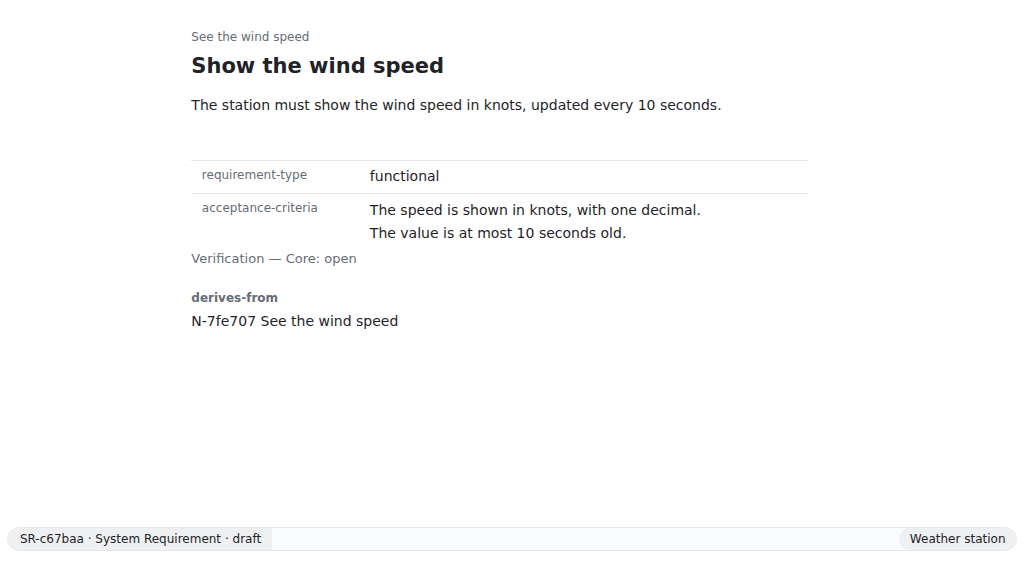
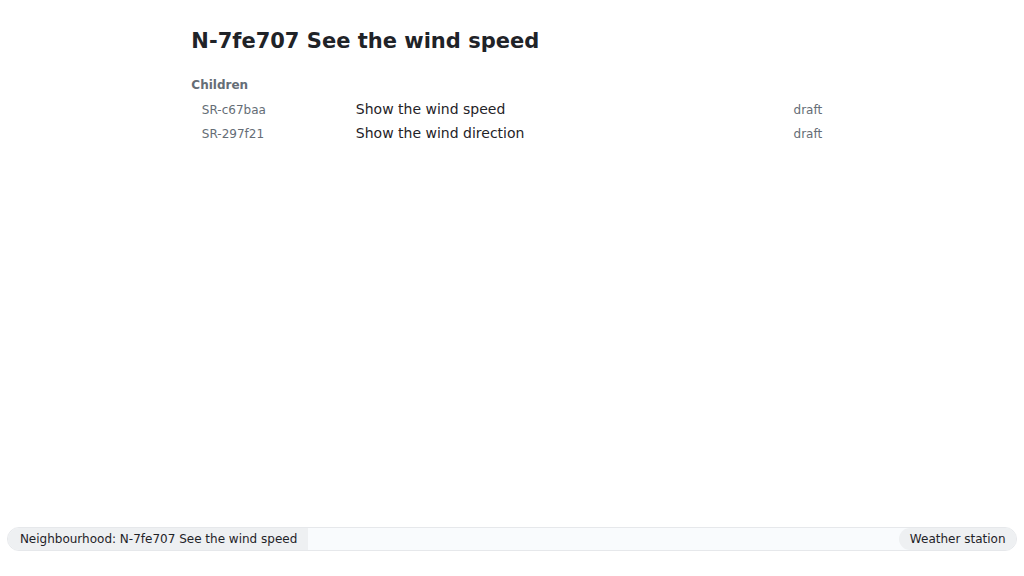
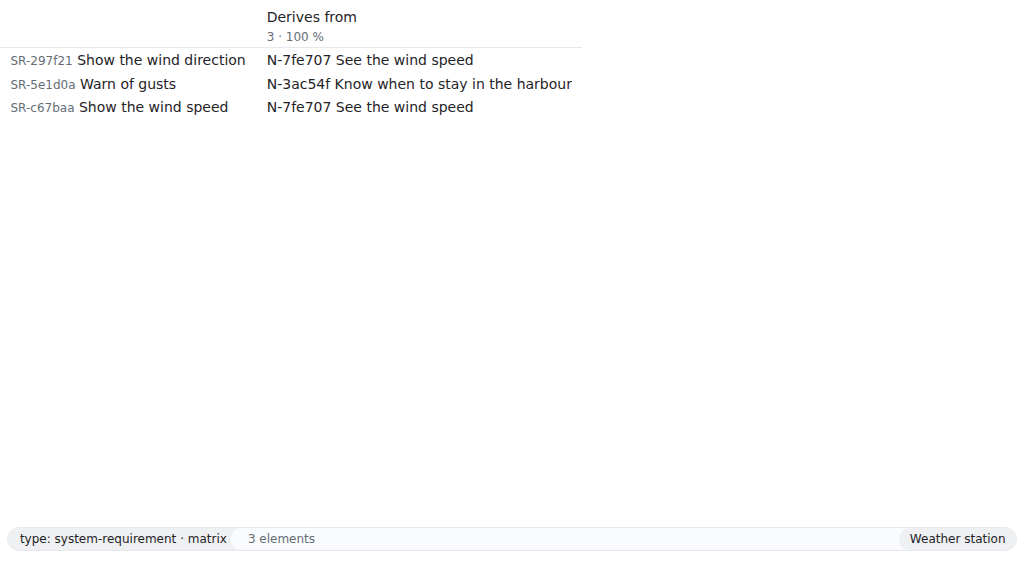
The commands start from a new workspace; in yours, use your own short IDs.
reqseq workspace init . "Weather station"reqseq element create need "See the wind speed" --text "As a sailor, I want to see the wind speed before I leave the harbour."N-7fe707 draft See the wind speed...reqseq element create system-requirement "Show the wind speed" --text "The station must show the wind speed in knots."SR-c67baa draft Show the wind speed...reqseq element create system-requirement "Warn of gusts" --text "The station must warn when a gust exceeds 25 knots."SR-5e1d0a draft Warn of gusts...reqseq relation add SR-c67baa derives-from N-7fe707reqseq relation add SR-5e1d0a derives-from N-7fe707reqseq trace chain N-7fe707N-7fe707 draft See the wind speedchildren: 1 ... [gap: no evidence] 1 ... [gap: no evidence]total: 3No problems.Both requirements are children of the need; the number is their depth below it, and the order of elements at the same depth may differ. A gap says what is missing, here evidence that the requirement is met.
reqseq trace related parents --refs SR-5e1d0aelements: N-7fe707 draft See the wind speedtotal: 1reqseq trace matrixcolumns:... name: Derives from count: 2...rows:...total: 3count says how many rows have a link in a column. With --json, each row has its cells: the elements at the other end, each with outdated.
A relation can also be set in the same call that creates or changes the element, by any reference relation add takes, one target or a JSON list per kind:
reqseq element create system-requirement "Warn of storms" --relations derives-from=N-7fe707reqseq element update SR-c67baa --remove-relations derives-from=N-7fe707reqseq element update SR-c67baa --add-relations derives-from='["N-7fe707"]'A requirement that derives from nothing is a gap in the chain: its parent is missing. The chain marks it, and workspace check lists every such requirement as a warning trace.no-parent, so one command finds them all:
reqseq element create system-requirement "Log the wind" --text "The station must log the wind speed every minute."SR-62fb87 draft Log the wind...warning trace.no-parent ...reqseq trace chain SR-62fb87SR-62fb87 draft Log the wind [gap: no parent] [gap: no evidence]total: 1No problems.reqseq workspace checkok: true...warning trace.no-parent ... System Requirement SR-62fb87 has no parent: no relation with the meaning derivation names one (element SR-62fb87)Which relation kinds lead to a parent is up to the metamodel: every kind with the meaning derivation, in the standard model derives-from and refines. based-on has no meaning, so a decision is no parent; Extend the metamodel shows how a project makes it one.
Start the API in the workspace with reqseq serve api, and send each command with the token of api.json as Authorization: Bearer <token>:
POST /v1/commands/relation.add
{ "source": "SR-c67baa", "kind": "derives-from", "target": "N-7fe707" }
POST /v1/commands/trace.chain
{ "ref": "N-7fe707" }POST /v1/commands/trace.related
{ "direction": "parents", "refs": ["SR-5e1d0a"] }POST /v1/commands/trace.matrix
{}POST /v1/commands/workspace.check
{}The answer is the output of the command as JSON, the same as --json of the CLI.
An agent connected to reqseq mcp calls the same commands as tools:
{ "name": "relation_add", "arguments": { "source": "SR-c67baa", "kind": "derives-from", "target": "N-7fe707" } }{ "name": "trace_chain", "arguments": { "ref": "N-7fe707" } }{ "name": "trace_related", "arguments": { "direction": "parents", "refs": ["SR-5e1d0a"] } }{ "name": "trace_matrix", "arguments": {} }{ "name": "workspace_check", "arguments": {} }The reference has every option of relation.add, trace.chain, trace.related, trace.matrix and workspace.check.